


In InDesign you can create links to files or Excel spreadsheets. This way if you change the content in Excel you can update the content in InDesign easily by clicking on the modified icon in the Update Panel.
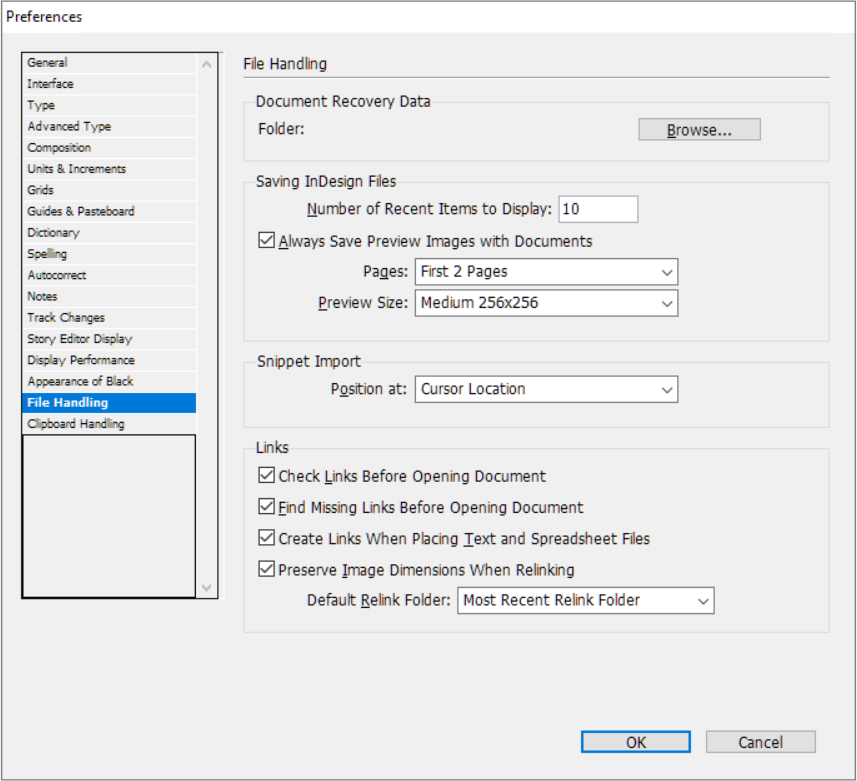
For this to work you have to change a setting in your new document. Go to: Edit => Preferences => File Handling and select the setting:
- Create Links When Placing Text and Spreadsheet Files
To add the table go to File => Place…

Make sure to NOT select “Replace selected item”, because if you select this the link will not always work, but DO select “Show Import Options” so:

The default import options can be used:

Make sure to position the table with the menu on top:

Now if you change the numbers in Excel you just click on the modified button in the Links Panel:
